Resource Tags
Labelling resources for categorisation and dynamic matching
Tags are labels you can apply to resources to describe their capabilities or characteristics. For example, you might tag pharmacists as "full-scope-pharmacist" or rooms as "private".
What Are Tags?
A tag is a short label applied to a resource — like "full-scope-pharmacist", "private", or "has-bp-machine". You can apply as many tags as you like to a single resource.
Tags are displayed as badges on resource list and detail pages, making it easy to see a resource's capabilities at a glance.
When to Use Tags
Tags are useful for:
- Categorising staff by qualification — tag pharmacists as "full-scope-pharmacist" or "immuniser"
- Categorising rooms by capability — tag rooms as "private", "has-bp-machine", or "injection-room"
- Enabling dynamic availability — services using the Dynamic availability mode match resources by tag, so you can define requirements like "1 full-scope-pharmacist" and the system finds a matching pharmacist automatically
Adding Tags to a Resource
You can add tags when creating or editing a resource:
- Go to Settings → Resources
- Click on a resource (or create a new one)
- Click Edit
- In the Tags field, type a tag value
- Select from the suggestions that appear, or create a new tag by pressing Enter
- Save
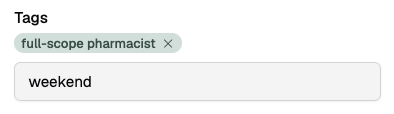
Typeahead Suggestions
The tag input shows existing tags already used at your site, so you can reuse consistent labels. If you type a value that doesn't match any existing tag, you'll see a "Create new tag" option.
Removing Tags
Click the × on a tag badge to remove it from the resource. The tag is removed when you save.
Tags and Dynamic Availability
Tags are most useful when combined with the Dynamic availability mode on service offerings. Dynamic services define resource requirements by tag (or resource kind), and the system automatically matches available resources for each timeslot.
When you tag a new pharmacist as "full-scope-pharmacist", they are automatically included in availability for any dynamic service that requires a "full-scope-pharmacist" — no need to update service links. (This applies when the service is not constrained to linked resources. See Dynamic Availability for details.)