Error Reference
Understanding AIR error messages and status codes displayed in Light
When AIR operations fail or return warnings, Light displays a toast notification with the status code and message returned by AIR. This page explains how to interpret these messages.
How Errors Are Displayed
Light shows AIR errors as toast notifications containing:
- A status code returned by AIR (e.g., a numeric or alphanumeric code)
- A descriptive message explaining the issue
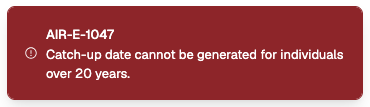
Error codes and messages come directly from AIR's API responses. The exact codes and wording are determined by Services Australia and may change over time.
Error Categories
Connection Errors
Errors when Light cannot communicate with AIR.
| Symptom | Likely Cause | Solution |
|---|---|---|
| "Failed to communicate with the server" | Network issue | Check internet connection, try again |
| "Activation failed" with status code | Invalid credentials | Verify Organisation ID and activation code |
| Device not connected | PRODA device expired or not set up | See Connection Issues |
Patient Identification Errors
Errors when a patient cannot be found in AIR.
| Symptom | Likely Cause | Solution |
|---|---|---|
| Red "Not Identified" badge | Medicare details don't match | Verify card number, IRN, and date of birth |
| Individual not found | Patient not registered in AIR | Confirm details with patient's Medicare card |
See Patient Identification Issues for more detail.
Submission Errors
Errors when recording or updating vaccination encounters.
| Symptom | Likely Cause | Solution |
|---|---|---|
| Encounter rejected | Invalid or missing data | Check all required fields are complete |
| "Failed to record encounter" | Server or validation error | Review field values, try again |
| Pended / action required | AIR flagged for review | Use Accept and Confirm workflow |
See Submission Errors for more detail.
Warning Statuses
Warnings don't block submission but flag potential issues:
| Status | Meaning | Action |
|---|---|---|
| PENDED / PENDING | Encounter requires review | Accept and confirm if details are correct |
| WARNING | Potential issue flagged | Review warning details, confirm if appropriate |
| INDIVIDUAL_NOT_FOUND | Patient not matched initially | Verify details and accept and confirm |
Interpreting Toast Notifications
When you see an error toast:
- Read the full message — it contains the AIR status code and description
- Note the code — this identifies the specific issue
- Check this page for the category matching your error
- Follow the solution or contact the Light Support Team with the exact error text
If you encounter an error not listed here, contact the Light Support Team with the exact error message and code from the toast notification.