Activate PRODA Device
Connect Light to AIR by activating your PRODA B2B device
Activate your PRODA device to establish the connection between Light and AIR.
Step 1: Open the Activation Form
- Go to Settings → Integrations in Light
- On the AIR Integration card, click Activate
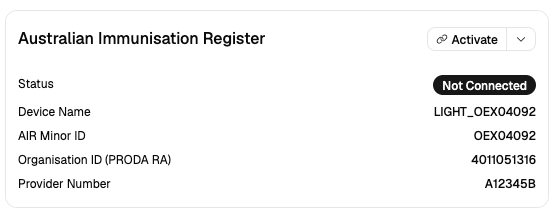
Step 2: Review Your Details
The form displays three read-only fields from provider setup. Verify they match your PRODA records:
- Device Name
- AIR Minor ID
- Organisation ID (PRODA RA)
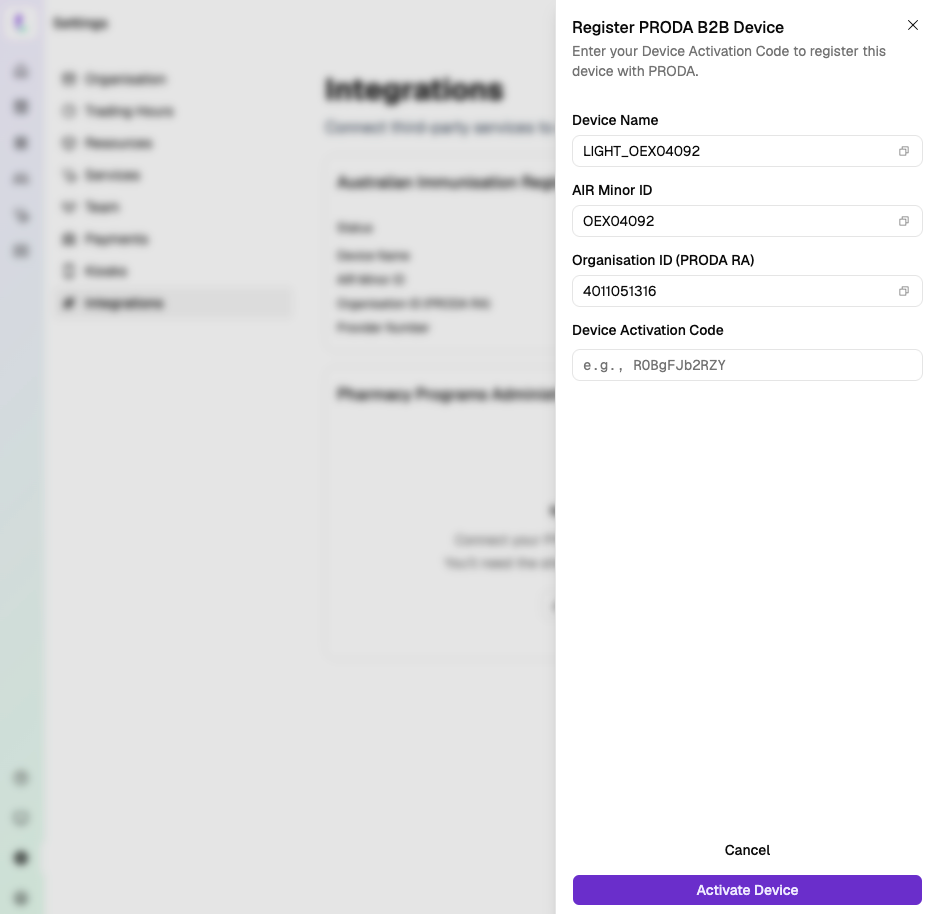
Step 3: Enter Activation Code
Paste the activation code you generated in PRODA.
Step 4: Activate
- Click Activate Device
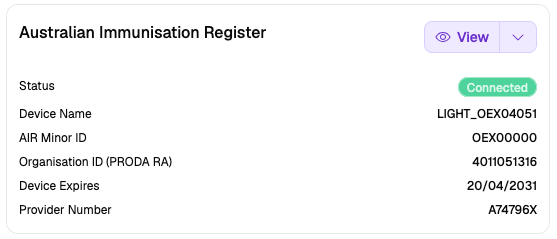
- On success, the card updates to Connected
Troubleshooting
| Error | Solution |
|---|---|
| Invalid Organisation ID | Verify the RA number in PRODA — numbers only |
| Invalid Activation Code | Ensure the full code is pasted with no spaces |
| Expired Activation Code | Generate a new code from the same device in PRODA |
| Network error | Check your internet connection and try again |
For more help, see Connection Issues.
Next Step
Submit Online Claiming Provider Agreement (HW027) — notify Services Australia of your Minor ID.