Managing Additional Vaccine Indicator
Add or remove the special risk group indicator for patients requiring additional vaccines
The additional vaccine indicator identifies patients who require vaccines beyond the standard NIP schedule due to medical conditions, occupational risk, or other special risk factors.
What It Does
When set, the indicator:
- Flags the patient as belonging to a special risk group
- May modify their vaccination schedule and due vaccine list
- May provide access to additional funded vaccines
- Appears as "Special Risk Group" in the Individual Indicators card
When to Set
- Patient has medical conditions requiring additional vaccines (e.g., immunocompromised)
- Patient belongs to an occupational risk group (e.g., healthcare workers)
- Clinical determination that additional vaccines are needed
Only set this indicator based on clinical assessment and documented risk factors. Remove it when the risk status changes.
How to Add
- Open the patient's profile (must have green AIR badge)
- Find the Individual Indicators card
- Click the Vaccine Indicator button in the card header
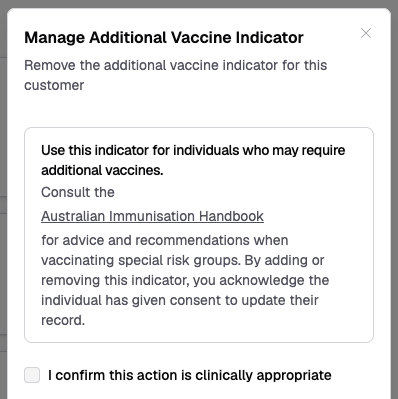
- Review the description and confirm the action is clinically appropriate
- Click Add Indicator
How to Remove
- Open the same Vaccine Indicator sheet
- The sheet will show the remove option when the indicator is currently set
- Confirm removal
- Click Remove Indicator
The sheet automatically detects whether the indicator is currently set and shows the appropriate add or remove action.