Recording Natural Immunity
Document laboratory-confirmed natural immunity to vaccine-preventable diseases
Record natural immunity to document that a patient has laboratory-confirmed immunity to a vaccine-preventable disease. Natural immunity records are submitted directly to AIR and are recognised for benefits, school enrolment, and childcare requirements.
When to Record
- Laboratory-confirmed disease diagnosis
- Serology showing protective antibody levels
- Documented immunity meeting Australian Immunisation Handbook criteria
Natural immunity should only be recorded based on laboratory confirmation. Patient or parent report of previous disease without lab confirmation is not sufficient.
How to Record
- Open the patient's profile (must have green AIR badge)
- Find the Medical Exemptions card
- Click the action to record natural immunity
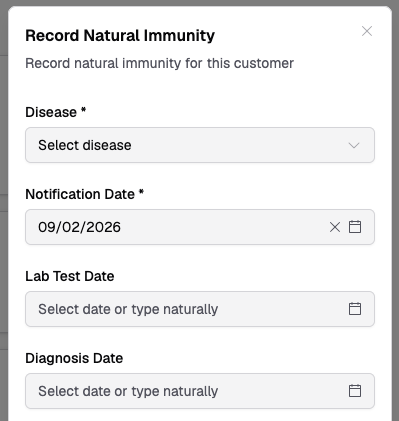
- Complete the form:
Form Fields
- Disease/Antigen (required) — select the disease from the dropdown
- Notification Date (required) — when immunity was notified to AIR
- Laboratory Test Date (optional) — when the lab test confirmed immunity
- Diagnosis Date (optional) — when the disease was diagnosed
- Review all details and click Submit