Updating Existing Vaccination Encounters
Edit existing vaccination records marked as editable
You can update existing vaccination records in AIR when they are marked as editable.
Which Records Are Editable?
Not all records can be edited. AIR determines editability based on:
- Time elapsed since submission
- Which provider submitted the record
- Vaccine type and program
- Whether the record has been used for benefits or requirements
Editable records show a dropdown menu on the record in the immunisation history. Records without a dropdown cannot be modified through Light — contact Services Australia for corrections.
How to Update
- Open the patient's immunisation history
- Find the record to update (must have dropdown menu)
- Click the dropdown and select Edit
- The Edit Vaccination Encounter form opens with current values pre-filled
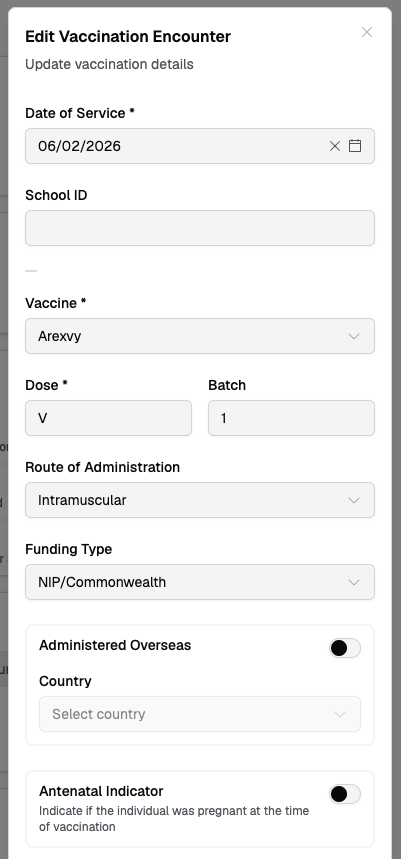
- Modify the fields that need correction
- Some fields may be read-only if AIR doesn't allow changes
- If the record has warnings, you may need to check Accept and Confirm — see Accept and Confirm
- Click Update Encounter
If a record is not editable and you need to make corrections, contact Services Australia at 1300 550 115.