Claims Screen Updates
Filter, sort, and page through your claims with date filters, status cards, and tooltips
16 April 2026 · Feature
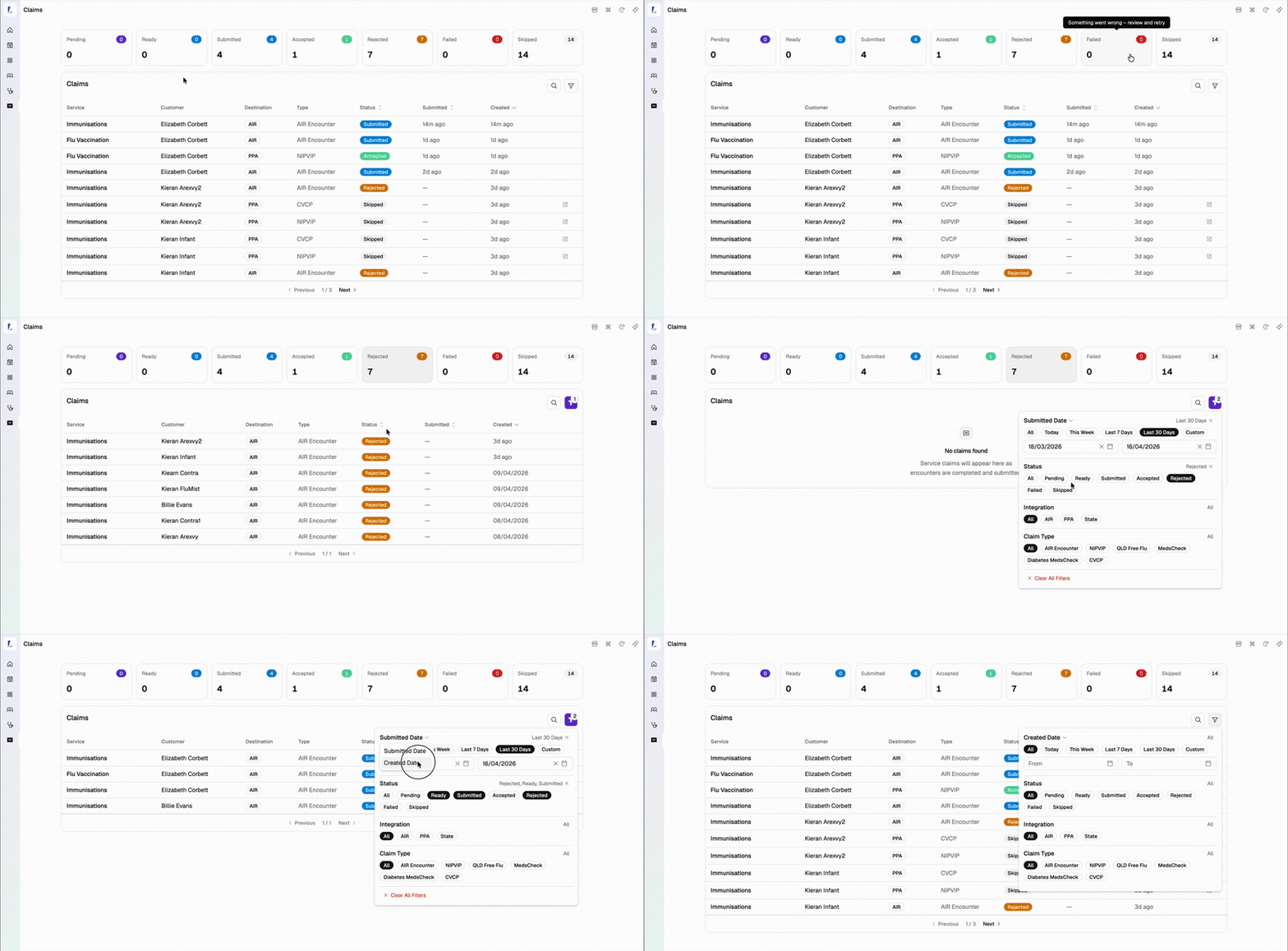
The Claims screen has had a major upgrade to help you track and reconcile your claims more easily.
What's new
- Filter by date — narrow down claims by the date they were created or submitted. You can also filter specifically for CVCP (COVID-19) claims within the date filter.
- Status cards — tap a status card at the top of the screen to instantly filter the table to just that status. Tap it again to clear the filter.
- Status tooltips — hover over any status in the top bar to see a quick explanation of what it means.
- Page through claims — no more scrolling through one long list. Claims are now split across pages so you can move through them at your own pace.
How to use it
- Go to Claims in the sidebar
- Use the date filter at the top to pick a date range (created or submitted)
- Tap a status card to jump straight to claims with that status
- Hover over a status label to see what it means
- Use the page controls at the bottom to move between pages